
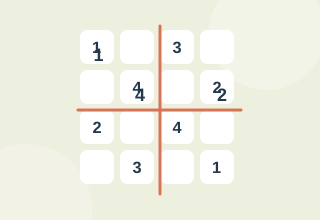
Mini Sudoku ↗
Fill a 4 by 4 Sudoku so each row, column and box has 1 to 4.
Count favorable outcomes for a simple random draw.
Enable JavaScript to play. Instructions remain available below.
What is the probability of drawing red? 3 red counters and 4 blue counters
the answer is 3/7. Favorable outcomes divided by all outcomes.
Write down what is known and what is only assumed. Look for constraints that eliminate possibilities, then test a small next step. A wrong answer is useful information about the strategy you chose.
This is a recreational logic activity. Results describe performance on this particular task, with this device and these rules. They are not a clinical assessment, IQ score or promise of improvements in daily life. Your best result and recent sessions stay in this browser; no account is required.
Yes. You can play the full activity without a payment, download or account.
Use Tab to focus buttons and Enter or Space to activate them. Answer fields accept normal typing. The maze also supports arrow keys. Timed tests will differ between touch, mouse and keyboard input.
Practice, a different generated puzzle, distractions and input timing all affect results. Compare several sessions rather than drawing a conclusion from one attempt.
Fill a 4 by 4 Sudoku so each row, column and box has 1 to 4.

Toggle a tile and its neighbors until the whole board is dark.

Infer a three-digit code from exact-position and misplaced-digit clues.

Plan ahead against a computer opponent that checks threats.